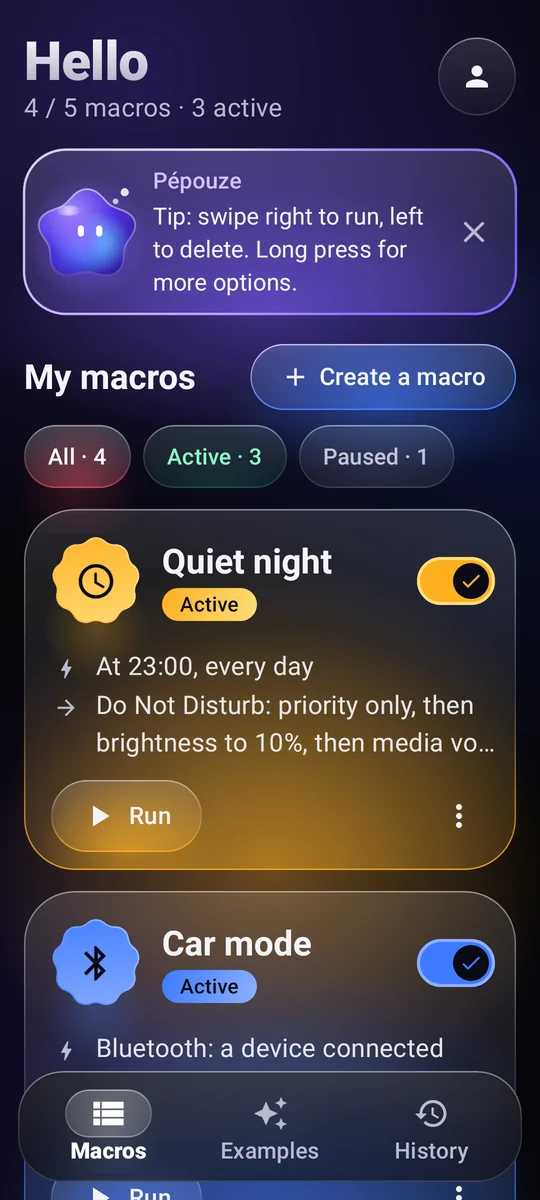
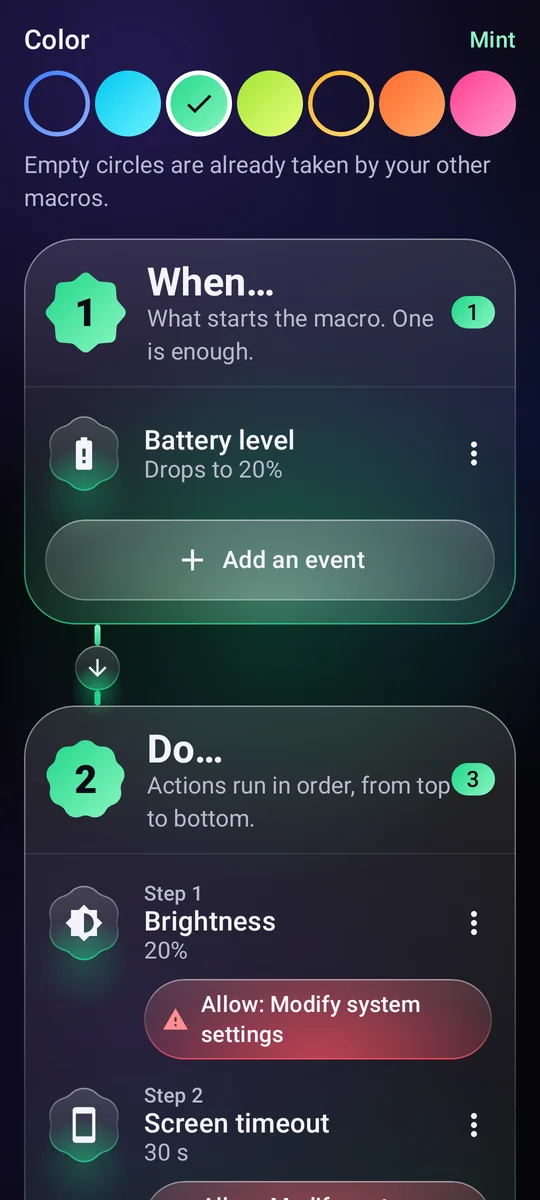
What starts the macro
A time and days, Wi-Fi, Bluetooth, headphones, the charger, the battery level, the screen turning on, an app opening…
11 triggers Pépouze
Coming soon to Google Play
Automation for Android
Write a simple rule, “When… Do…”, and your phone takes care of it at the right moment, all by itself.
How it works
Every macro fits in one sentence. You build it from three blocks, no coding needed.
A time and days, Wi-Fi, Bluetooth, headphones, the charger, the battery level, the screen turning on, an app opening…
11 triggersVolume, ringer, Do Not Disturb, brightness, flashlight, music, alarm, timer, notification, reading a text out loud, opening an app or a link, tapping a text on screen…
29 actions to combineA time range, days of the week, a battery level, the phone charging.
Examples
Copy an example, tweak it, and you're done. Here are a few.
As soon as the car's Bluetooth connects, the volume goes up and the music picks up where it left off.
At 11 PM, Do Not Disturb turns on, brightness drops to the minimum and the music stops.
Below 20% battery, the screen dims and goes to sleep sooner.
When you plug in your headphones, playback starts at a gentle volume.
In the morning, when you unplug the charger, your phone tells you the time and the battery level.
Sunday to Thursday at 10:30 PM, a gentle reminder to put your phone down, and the screen dims.
Pépouze, your assistant
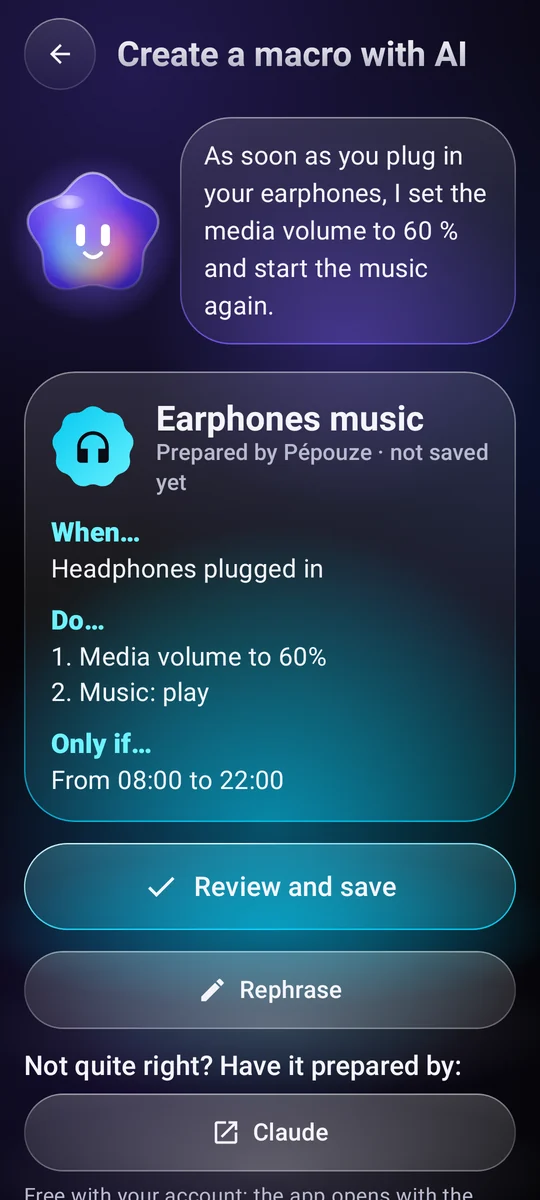
Describe what you want in one sentence. Pépouze prepares the macro, you check it, then you save it.
You“When I plug in my headphones, play music at 60%”
Share and run
Swap ideas with the community, and run your macros without even opening the app.
A library of macros shared by users. Copy the one you like, publish your own. See the community
Show it to a friend, put it in a video: any camera opens it, and Pépouze imports it.
A home screen widget, a Quick Settings tile, or a shortcut: the macro runs right away.
Pépouze speaks 13 languages and understands your requests right on the phone.
You stay in control
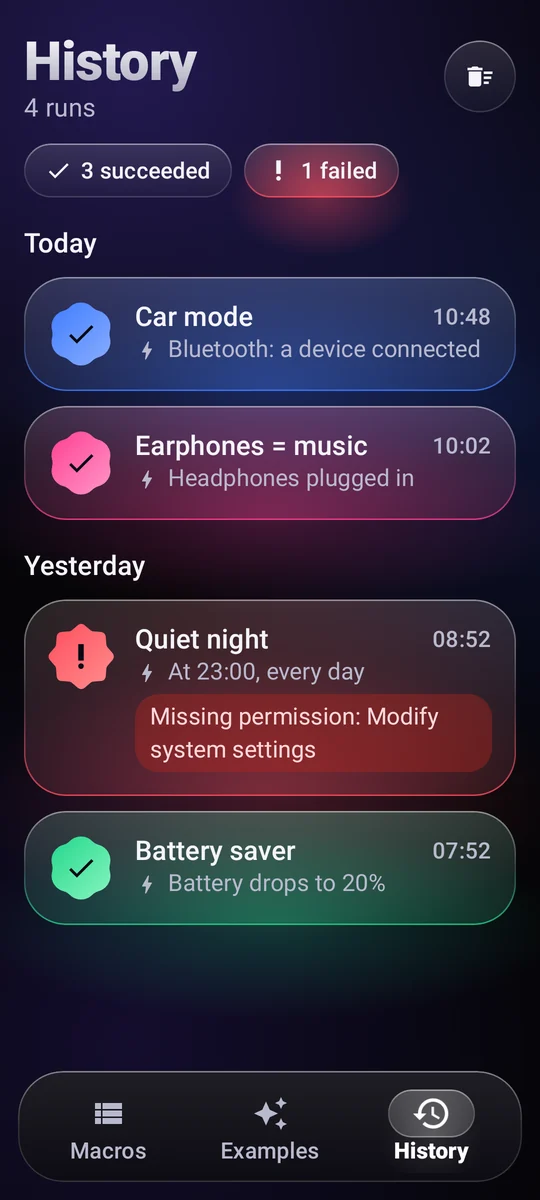
Every run is logged, successful or not, along with what triggered it.
A permission is only requested when a macro needs it, with an explanation.
To Google Drive or your phone, no account needed. Or online, with an account.
Your macros live on your phone. No analytics, no data sold.
Price
During the launch phase, Pépouze is completely free, with no ads. A paid version will follow: you'll be told beforehand, and your macros stay yours.
€0
FAQ
Only for what you add to your macros: tapping a text on screen, pressing Back or Home, locking the screen, taking a screenshot, knowing which app opens.
Screen text is only read to find the one to tap, and nothing leaves your phone. Pépouze acts only on the rules you wrote. The service only turns on with your consent, after a dedicated explanation, and you can switch it off at any time.
No. The account is only used to back up your macros online. You can also back them up to a file, on Google Drive or on your phone, with no account at all.
Yes, most of them: Pépouze listens for events in the background. To keep Android from putting it to sleep, choose “Battery: Unrestricted” on the app's page in Android settings. Actions that touch the screen need an unlocked phone.
No. The “Prepare a text message” action opens your messaging app with the number and text ready: you're the one who taps Send.
In the app: My account → Delete my account. Without the app, follow the account deletion page.
Free during launch, on Android.
Pépouze is coming soon. Try it before everyone else: write to us and we'll send you an invitation.